 Excelrs
Vibe Coding Event: Rules, Screening & How Winners Are Picked
How Excelrs runs a Vibe Coding event - participant rules, timeline, two screening rounds, and tips that score.
Om Kumar Choubey·22 October 2026 · 3 min read
A participant guide for Excelrs Vibe Coding events - what the format is, the rules while you build, how screening works, and how winners are declared.

What is vibe coding (in this event)?
Vibe coding is building with AI tools: you describe what you need in plain language, the tools generate code and UI, you review and fix, and you ship a working app you understand.
Typical builds: websites, dashboards, quiz apps, or a mobility solution from a problem statement.
Loop: Idea -> AI tools -> Review -> Working app.
Understanding the problem statement
- Understand the problem - read carefully before you build.
- Meet the requirements - implement every feature that is specified.
- Stay relevant - solve the actual problem, not unrelated extras.
- Be creative - useful extras only count when they add real value.
- Focus on functionality - required features must work.
- Use time wisely - essentials first, polish later.
Evaluation follows the official judging criteria. Extra features only help if the core is done.
How a Vibe Coding event works
- Receive the problem statement.
- Wait for the official start - do not begin early.
- Create your repository when instructions say so.
- Build with AI tools inside the time limit.
- Test the main features and fix errors.
- Submit by the deadline.
- Join screening - demo and code review.
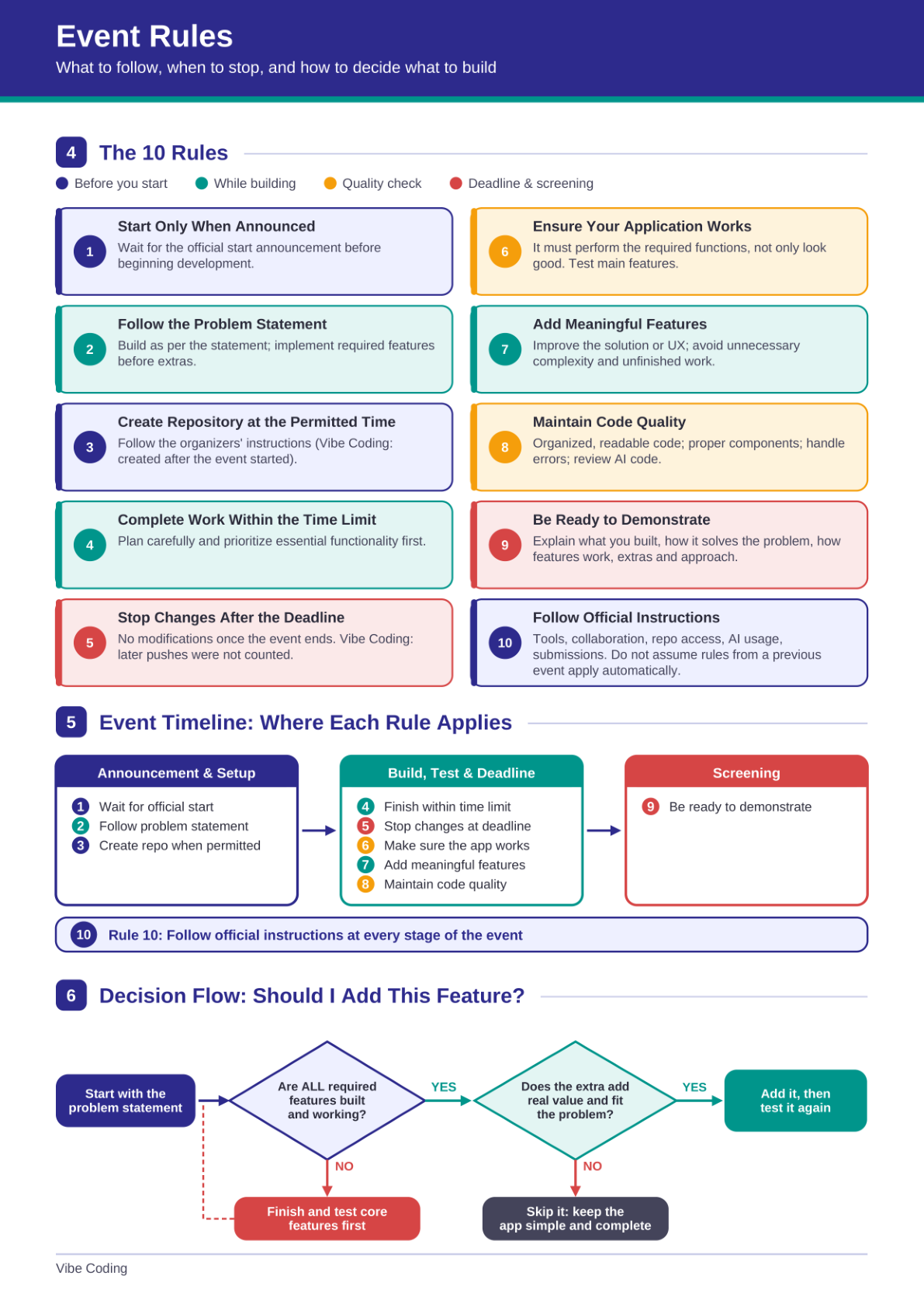
The 10 rules
Before you start
- Start only when announced.
- Follow the problem statement - required features before extras.
- Create the repository at the permitted time (after the event starts).
While building
- Finish inside the time limit - plan and prioritize.
- Stop changes after the deadline (later pushes were not counted).
- Make sure the application works - it must run, not only look good.
- Add meaningful features - improve the solution or UX; skip noise.
- Keep code quality - readable, organized; review AI output; handle errors.
Screening
- Be ready to demonstrate - what you built, how it solves the problem, your approach.
Always
- Follow official instructions on tools, collaboration, repo access, AI use, and submission.
Should I add this feature?
Start from the problem statement.
- Are all required features built and working? If no -> finish and test those first.
- If yes -> does the extra add real value and fit the problem? If no -> skip it. If yes -> add it and test again.
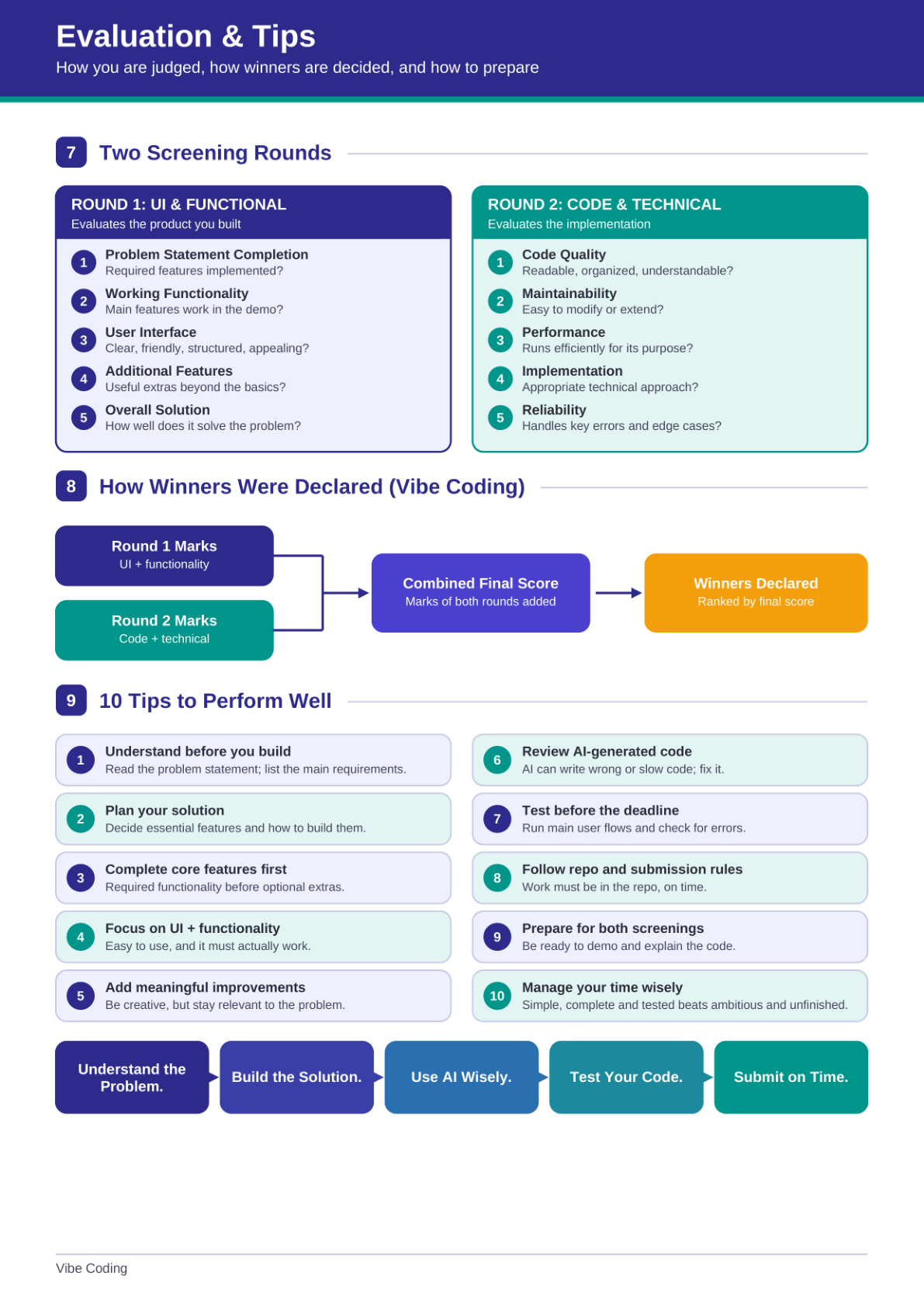
Two screening rounds
Round 1 - UI & functional (the product)
- Problem statement completion
- Working functionality in the demo
- User interface - clear and usable
- Additional features that help
- Overall solution quality
Round 2 - code & technical (the implementation)
- Code quality
- Maintainability
- Performance for the purpose
- Appropriate technical approach
- Reliability - errors and edge cases
How winners are declared
Round 1 marks + Round 2 marks -> combined final score -> ranked winners.
10 tips that score
- Understand before you build - list the main requirements.
- Plan the solution - essentials and how you will build them.
- Complete core features first.
- Focus on UI and functionality.
- Add meaningful improvements - creative but on-problem.
- Review AI-generated code - it can be wrong or slow.
- Test before the deadline - main user flows.
- Follow repo and submission rules.
- Prepare for both screenings - demo and explain the code.
- Manage time - simple, complete, and tested beats unfinished ambition.
Flow: Understand the problem -> Build the solution -> Use AI wisely -> Test your code -> Submit on time.
Source guide by Om Kumar Choubey for Lawazia Tech - Excelrs Program. Companion to the skill guide Vibe Coding: A Beginner's Guide.